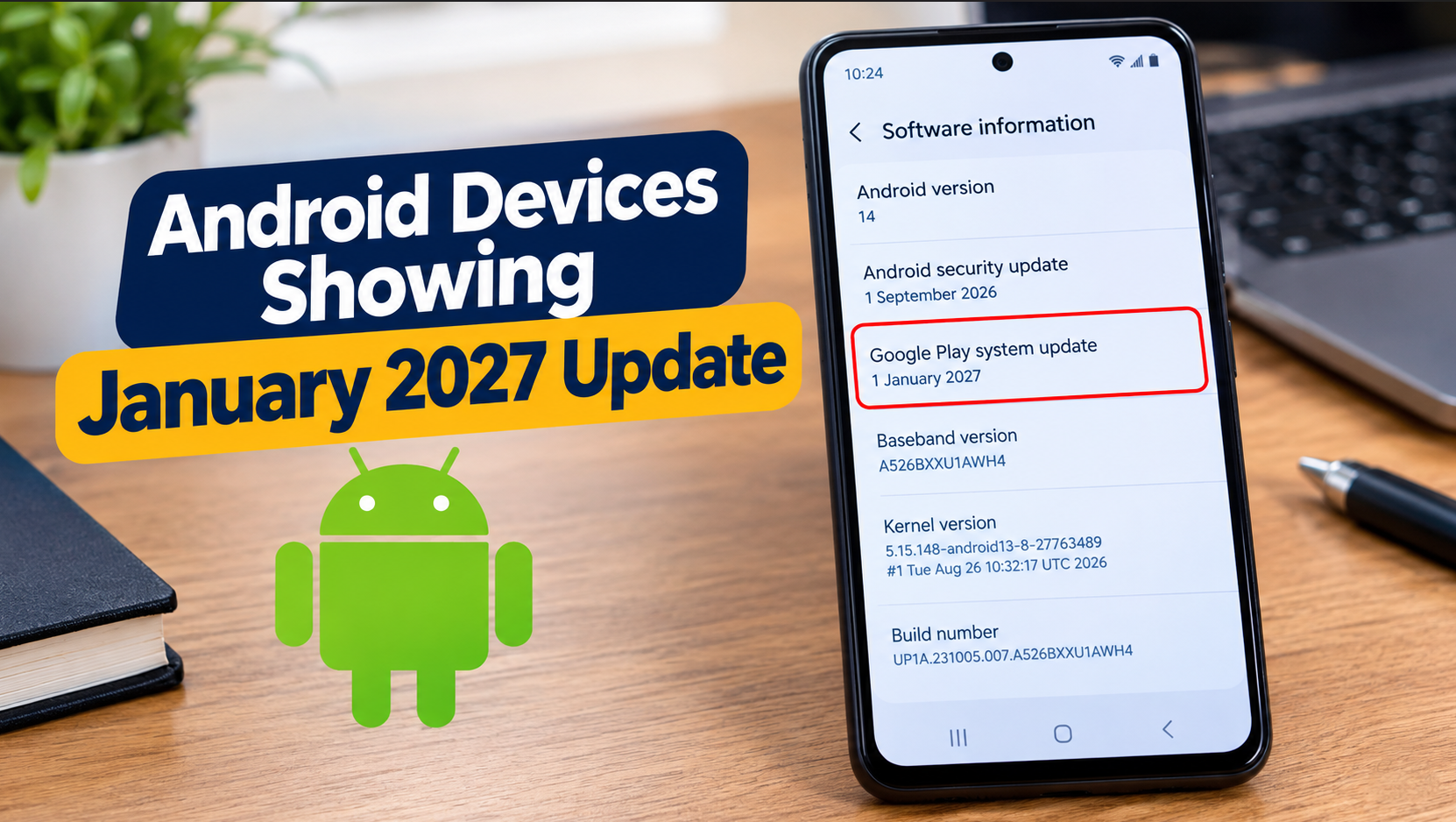
Android devices showing January 2027 update have attracted attention after smartphone users discovered an unexpected future date in their Google Play system update settings. The issue has been reported on several Samsung Galaxy phones, with some reports also mentioning devices from OnePlus, Motorola and other Android manufacturers.
The unusual part is that the date appeared in October 2026, even though January 2027 was still months away. This raised questions about whether Google had released an update ahead of schedule or whether something had gone wrong with the update information displayed on affected phones.
Reports published in October suggest that the issue involves the date displayed for a Google Play system update rather than a confirmed release of a future Android operating system version. There are also newer reports that a small update may be correcting the displayed date on some Samsung devices.
So, what is happening, which phones have reportedly been affected, and should Android users do anything about it?
Here is what we know so far.
Why Are Android Devices Showing January 2027 Update?
The issue came to attention after some Android smartphone owners noticed that their Google Play system update information displayed January 1, 2027, despite the current date being in October 2026.
According to reports from Android Authority and SamMobile, the unusual date appeared on some Samsung Galaxy devices after a Google Play system update. The update was reported to be approximately 100 MB on certain Galaxy phones.
The affected users were not necessarily seeing a new Android version or a major operating system upgrade. Instead, the unexpected date appeared in the section that identifies the installed Google Play system update.
Google Play system updates are designed to update certain Android components independently of a full operating system upgrade. They are separate from regular Android version updates and the monthly Android security patch level.
The exact technical cause of the future date has not been fully explained in the reports available at the time of writing.
However, the appearance of January 2027 does not establish that Google has released January 2027 security fixes ahead of schedule.
For users who have noticed the same date on their phones, the most important thing is to check their actual software information rather than assume that the date represents a new Android release.
Which Android Phones Are Showing the January 2027 Update Date?
The reports available in October 2026 identify several Samsung Galaxy models, while some users have also reported the same issue on phones from other manufacturers.
The following devices have been mentioned in reports or user discussions.
| Phone brand | Devices mentioned in reports |
|---|---|
| Samsung | Galaxy Z Fold 8, Galaxy S26 Ultra, Galaxy S23 Ultra, Galaxy S24 Plus and Galaxy A17 5G |
| OnePlus | Some users have reported seeing the date on OnePlus phones |
| Motorola | Some user reports have mentioned Motorola devices |
| Other Android brands | Reports have suggested that the issue may not be limited to Samsung |
Important: This is a list of devices mentioned in reports, not an official list of every affected phone.
The available evidence does not establish that every unit of these models displays January 2027. The situation may also differ depending on the installed software, device model and update rollout.
Android Authority initially reported that it had not found similar reports from Google Pixel owners at the time of its investigation. Subsequent reporting has suggested that the issue may extend beyond Samsung, so the full range of affected devices remains uncertain.
If your phone is not listed above, that does not necessarily mean it cannot display the same date. Check your own device’s Google Play system update information.
Is This a New Android Update From Google?
Not necessarily. The date displayed in the Google Play system update section should not be confused with the Android operating system version.
Android phones receive several types of software updates, and each serves a different purpose.
1. Android operating system updates
An Android operating system update can introduce new features, interface changes, performance improvements and changes to system functionality.
Major Android upgrades are distributed according to device compatibility and manufacturer rollout schedules.
A phone displaying January 2027 in its Google Play system update section does not automatically mean it has received a new Android operating system version.
2. Android security updates
Android security updates address vulnerabilities that could affect the operating system and related components.
The security patch level shown in your phone’s settings is separate from the Google Play system update date.
Consequently, a future date in the Google Play system update section does not prove that your phone has received all security fixes scheduled for January 2027.
Users should check the Android security update field separately to understand what their device reports.
3. Google Play system updates
Google Play system updates allow Google to update certain Android components without requiring a complete operating system upgrade.
These updates can deliver changes and improvements to supported components independently of a major Android release.
They are different from application updates delivered through Google Play and from the regular Android security patch level.
This distinction matters because the January 2027 date appeared in the Google Play system update information. It should not automatically be interpreted as the release date of a new Android version or proof that future security patches have been installed.
Has Google Fixed the January 2027 Update Date Problem?
There are emerging reports of a possible correction.
On October 24, 2026, Android-focused reporting described a small Google Play system update, reportedly around 11 KB, that changed the displayed date on at least some Samsung Galaxy devices from January 1, 2027, back to October 1, 2026.
The report suggests that the smaller update may be correcting the displayed update information rather than installing a completely new set of system components.
However, this development needs to be treated cautiously.
The reported correction has not been independently established across every affected Samsung model or other Android manufacturers. The available information also does not establish that Google has published a comprehensive official explanation of the original problem.
Therefore, it would be premature to declare that the issue has been fixed for all Android users.
If your Samsung phone still shows January 2027, check whether a Google Play system update is available through your device’s settings.
If your phone shows October 2026 or another date instead, check the rest of its software information as well. A corrected date does not, by itself, establish which security patches are installed.
Users with OnePlus, Motorola or other Android devices should follow their own manufacturer’s update instructions rather than assume that the reported Samsung correction applies to their phones.
Does the January 2027 Update Date Mean Your Phone Is Unsafe?
The date alone is not evidence that your phone has been hacked, infected with malware or exposed to a new security threat.
The reports describe an unusual Google Play system update date, but that information does not establish that the affected phones are experiencing a security problem.
It is equally important not to assume that a future date means a phone has received security fixes that have not yet been released.
To assess your device’s update status, check these three items separately:
- Android version: Identifies the main operating system version installed on your phone.
- Android security update: Shows the security patch level reported by the device.
- Google Play system update: Shows the date associated with its Google Play system update.
These fields provide different information. Checking them separately is more useful than relying on one unusual date.
If your phone works normally and the only unusual detail is January 2027 in the Google Play system update section, there is no reason to assume that your device has been damaged.
However, if you notice repeated update failures, unexpected restarts or other persistent problems, investigate those symptoms separately.
How to Check the Google Play System Update Date on Android
You can check the date directly in your phone’s settings without downloading a third-party application.
The precise menu names may vary by manufacturer and Android version.
For Samsung Galaxy phones
If you own a Samsung Galaxy smartphone, follow these steps:
- Open Settings.
- Tap About phone.
- Select Software information.
- Find Google Play system update.
- Check the date displayed on the screen.
On some Samsung devices, the update option may be accessible through a different settings menu or a section related to security and updates.
If your phone shows January 1, 2027, that is the date currently displayed for the Google Play system update. It does not independently confirm that your device has received January 2027 security patches.
If an update is available, follow the instructions displayed by your phone.
For other Android phones
On other Android devices, the relevant setting may be located under a section such as Security and privacy, System or Google.
Try the following:
- Open Settings.
- Look for Security and privacy or System.
- Open the available update section.
- Find the Google Play system update option.
- Check the displayed date and whether an update is available.
If you cannot find the option, consult your manufacturer’s official support instructions for your specific model.
Do not assume that menu instructions for a Samsung phone will be identical on a Motorola, OnePlus or Google Pixel device.
Should You Install the Google Play System Update?
If your phone offers an official Google Play system update, you can generally follow the normal installation process provided by your device.
However, the January 2027 date itself is not a reason to force an update or install unofficial software.
Before proceeding, keep the following precautions in mind:
- Use the built-in update settings on your phone.
- Connect to a reliable internet connection.
- Ensure your battery has sufficient charge.
- Follow the instructions displayed during installation.
- Avoid downloading unknown APK files advertised as fixes for the January 2027 issue.
If your phone already displays the unusual date but does not offer a new update, do not assume that something is wrong simply because the reported correction has not appeared on your device.
Updates can be distributed at different times, and availability may vary between devices.
If the problem persists, check the manufacturer’s official support resources for your model.
Should You Reset Your Phone to Correct the Date?
A factory reset is not a recommended first step for this issue.
Resetting a phone erases local data and can require you to reinstall applications and restore your information. It is also not a guaranteed way to correct an update date supplied through system update information.
Likewise, manually changing your phone’s date and time is not an established solution to the reported issue.
Before attempting any disruptive troubleshooting, check whether an official update is available and look for guidance from your device manufacturer.
If your phone is functioning normally, it is generally more sensible to monitor the update information than to erase your data in an attempt to correct the displayed date.
What Android Users Should Do Now
For users seeing January 2027 in their Google Play system update settings, the next steps are relatively straightforward.
First, check your device’s software information. Confirm the Android version and security patch level separately from the Google Play system update date.
Second, check for official updates. Use the update mechanism provided by your phone’s manufacturer and install legitimate updates when available.
Third, avoid unofficial fixes. Do not install unknown applications, flash unofficial firmware or follow instructions that require disabling important security protections just to change the displayed date.
Fourth, monitor reliable reporting. The cause and scope of the issue may become clearer as Google, manufacturers and technology publications provide additional information.
Finally, do not panic over the date alone. The available reports do not establish that every affected phone is experiencing a security problem or that the displayed date represents a future Android release.
Frequently Asked Questions
Why are Android devices showing January 2027 update?
Some Android devices have displayed January 1, 2027, in the Google Play system update section during October 2026. Reports have particularly mentioned Samsung Galaxy phones. The date should not automatically be interpreted as a new Android version or proof that future security patches have been installed.
Which Samsung phones are reportedly affected?
Reports have mentioned the Galaxy Z Fold 8, Galaxy S26 Ultra, Galaxy S23 Ultra, Galaxy S24 Plus and Galaxy A17 5G. This is not an official list of all affected models, and individual devices may display different update dates.
Are OnePlus and Motorola phones affected?
Some users have reported seeing the same date on OnePlus and Motorola devices. These reports suggest that the issue may extend beyond Samsung, but the full scope has not been established.
Has Google released a fix for the January 2027 update date?
A report published on October 24, 2026, described a small update that reportedly corrected the displayed date on at least some Samsung devices. However, the correction has not been independently confirmed across every affected model or manufacturer.
Does the January 2027 date mean my phone has the latest security update?
No. The Google Play system update date is separate from the Android security patch level. Check the security update information in your phone’s settings to determine which patch level your device reports.
Can the January 2027 update date damage my phone?
The date alone is not evidence of physical damage or a software malfunction. If your phone works normally, there is no reason to assume that the displayed date has damaged it.
Should I factory-reset my Android phone?
No, not as an initial response to this issue. A factory reset erases local data and is not an established solution for correcting the displayed update date.
Why does my phone show a different Google Play system update date?
Update dates can vary between devices depending on the software installed and the updates made available to them. A different date does not automatically mean that a phone is affected by the same issue.
How can I check my phone’s Google Play system update?
On many Samsung phones, open Settings, select About phone, tap Software information and look for Google Play system update. Other Android devices may place the option under System or Security and privacy.
Final Verdict on Android Devices Showing January 2027 Update
The appearance of January 1, 2027, in the Google Play system update section has raised questions among Android users because the date appeared months before January 2027.
Reports published in October 2026 have identified several Samsung Galaxy models, with additional user reports suggesting that other Android brands may also be affected.
A newer report suggests that a small update may be correcting the displayed date on some Samsung devices, but a universal fix has not been established.
For now, Android users should check their Google Play system update date, Android version and security patch level separately. Install official updates when available, avoid unofficial fixes and consult the appropriate manufacturer’s support resources if further problems occur.
Does your Android phone show January 1, 2027, as its Google Play system update date, or has it returned to October 2026? Share your phone model and the date displayed in the comments.